
When you write a formula for a folder, you can use SELF() inside FOLDER to refer to the folder containing that formula. You do not need to select its name.
Our example is the folder’s own average:
FLEXAVERAGE(FOLDER(SELF()))1. Start with a folder
Create a folder called Tests with three test columns directly inside it. All tests are marked out of 10. Alex’s grades are 6, 8 and 4.
Open the folder’s calculation settings and choose Formula. For this example, the formula belongs to the folder itself, rather than a separate calculation column outside it.
2. Enter the formula
Use the Functions list to build:
FLEXAVERAGE(FOLDER(SELF()))Insert Self reference (SELF()) inside FOLDER, and FOLDER inside FLEXAVERAGE. SELF() takes no arguments; keep its empty parentheses.
Read the formula as: Take this folder’s own immediate columns and calculate their average.
3. Understand the three parts
- SELF(): in this FOLDER reference, identifies the column containing the formula. Here, that column is the Tests folder.
- FOLDER(SELF()): selects the immediate columns inside that folder.
- FLEXAVERAGE(...): averages their non-empty values.
The folder itself is excluded from the expanded selection, so the formula does not average its own result again.
4. Check the result
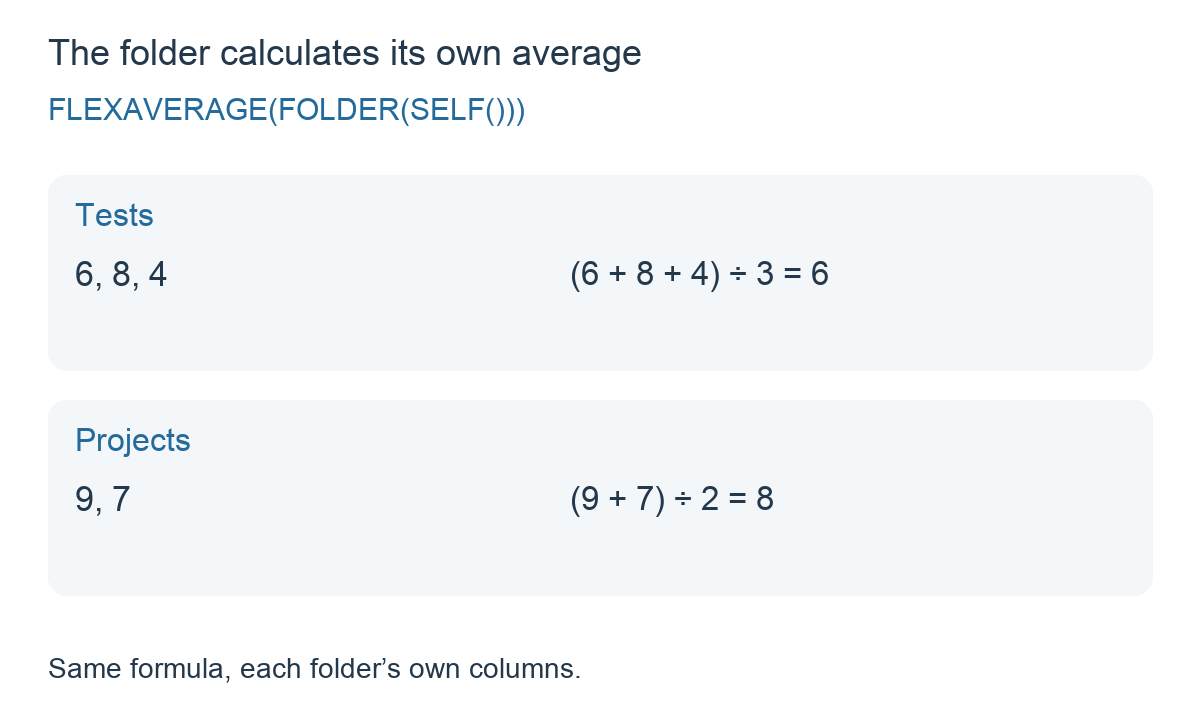
For Alex, the calculation is (6 + 8 + 4) ÷ 3 = 6.
Add a fourth test directly inside Tests and enter 10 for Alex. The same formula now gives (6 + 8 + 4 + 10) ÷ 4 = 7. You do not need to insert the new test reference into the formula.
If the fourth cell stays empty, FLEXAVERAGE skips it and the result remains 6. An entered zero is included.
5. Reuse the formula in another folder
Suppose a Projects folder contains two columns, with grades 9 and 7. Set that folder’s own calculation to the same formula:
FLEXAVERAGE(FOLDER(SELF()))The result is (9 + 7) ÷ 2 = 8. Because the formula uses SELF() inside FOLDER, it selects Projects’ own columns rather than referring back to Tests.
Things to remember
- Use the folder’s own formula settings for this example. A formula in an unrelated column is a different context.
- SELF() supplies the reference in this example, not the average. Keep FOLDER and FLEXAVERAGE around it as shown.
- Only the first level is selected. A subfolder contributes its own result column; its individual columns are not expanded.
- Use the same grade scale. These sample test grades are all out of 10.
Related guide: FOLDER: Use a folder in a formula.